Your guide to VMware vSphere Foundation in a homelab
Welcome to the comprehensive guide for deploying VMware vSphere Foundation in a homelab environment on a single ESXi host. This project is dedicated to documenting each step, providing clear instructions, and sharing valuable insights from a real-world educational perspective. Join me as we explore the foundations of virtualisation.
Deployment Of VMware vSphere Foundation in a homelab
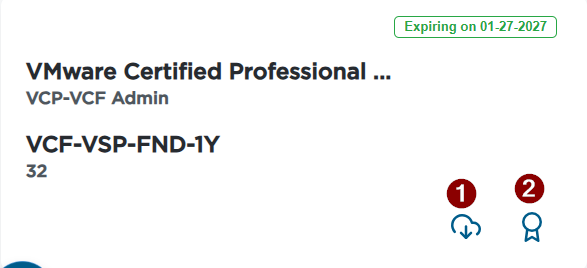
If you have obtained VCF or VVF certification you are entitled for VVF license for 12 months with 32 cores. When signing with VMUG advantage you obtain full stack of VCF with 128 cores. In this page I will be demonstrating how to build VVF environment in your homelab using single host.
When signing up for vmug advantage make sure you are using same email address you are using for Broadcom portal
What happens when the emails match:
-
VMUG Advantage can see your VCP‑VCF certification
-
It automatically assigns the correct VCF 128‑core license
-
Your license expiry is calculated correctly
-
No manual intervention needed
What happens when the emails do NOT match:
-
VMUG cannot see your VCP‑VCF certification
-
You get the default VVF license instead
-
Your VCF entitlement never appears
-
You must open a support ticket to fix it
Software Prerequisites:
You will receive a congratulations email from Broadcom with link to the licensing portal. https://support.broadcom.com/group/ecx/alpine-certificate
Generate download token which will be used to configure SDDC Manager VCF Installer.
Click on my Downloads and open VMware vSphere Foundation
Select the latest release and download Esxi 9 and VCF Installer using the view group link on right.

Hardware Prerequisites:
In my environment I am running:
13th Gen Intel i9
128GB Memory
NVME - 500GB & 3.8TB
By default when deploying VVF or VCF 9 minimum host requirement is three but I will be updating the JSON file with one Esxi host..
Deployment through interactive wizard requires you to have 3 nodes but deployment with JSON file we can deploy with single Esxi host.
Network Connectivity:
NTP service is available either internal or external. I have deployed Chrony NTP service on Ubuntu server.
DNS Host A record and PTR record needs to be created for:
Esxi host - esxi02.homelab.local
vcenter - vcsa.homelab.local
VCF Operations - vcf-operations.homelab.local
I am using Ubiquiti devices:
Ubiquiti Dream Pro - Has built-in local DNS
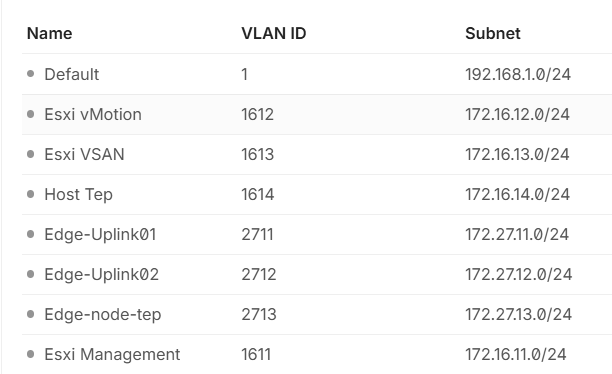
Created VLANS for Management, VSAN & Vmotion
Don't miss out on the chance to save while enjoying the quality and service you love. Keep an eye on this space for the latest updates and grab these amazing deals while they last!