Licensing VMware vSphere Foundation
Starting with version 9.0 of VMware Cloud Foundation (VCF) and VMware vSphere Foundation (vSphere Foundation), you license your environment by using a VCF Operations instance and the VMware Cloud Foundation Business Services console (vcf.broadcom.com). Subscription-based license files replace the use of the 25-character license keys.
Register VCF Operations (Online Mode):
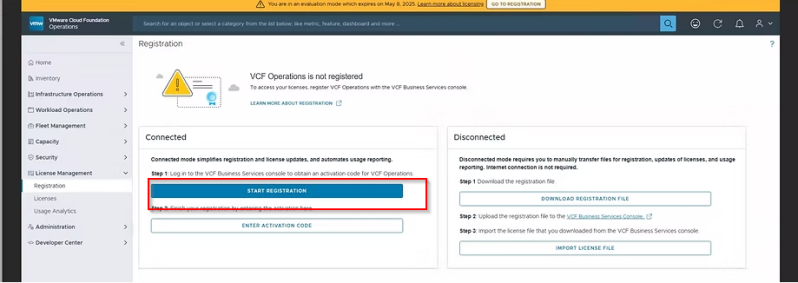
- Log in to your newly deployed VCF Operations instance (https://<operations-appliance-IP>).
- During the setup wizard, select the Connected mode for automatic activation.
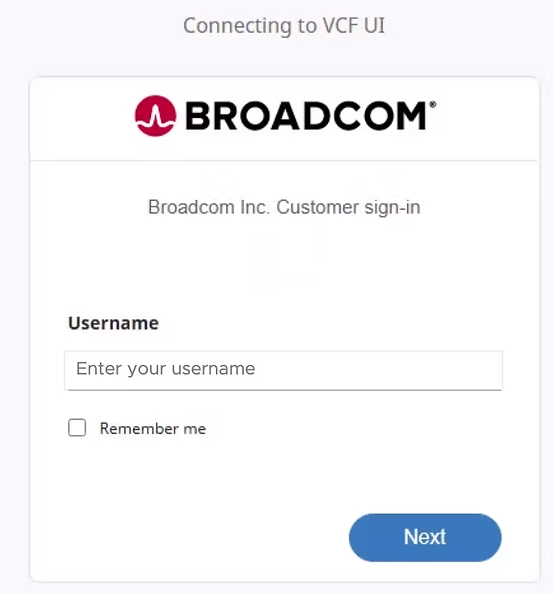
- Click on [START REGISTRATION] to be redirected to the Broadcom portal for authentication.
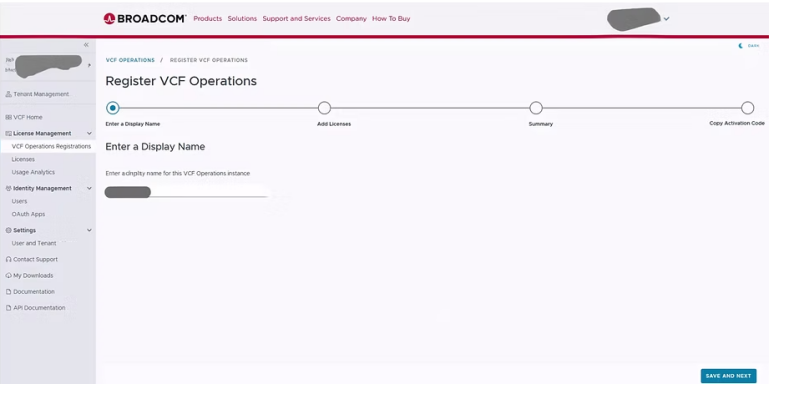
Activate in VCF Business Services Console (VCFBSC):
- Enter a display name for your license file, which should represent your environment.
- Select the necessary licenses, including primary vCenter and add-on licenses (e.g., vSAN), for your environment.
- Copy the activation code provided by the portal.
Complete Registration:
- Paste the activation code into the VCF Operations instance.
- The system will authenticate, download, and import the license file, changing the status to "Licensed".
Assign Licenses:
- Go to License Management within VCF Operations.
- Select the vCenter systems to which you want to assign the license